Cumulative Update 3 for Microsoft Exchange Server 2013

Issues that the cumulative update resolves

Cumulative Update 3 for Microsoft Exchange Server 2013 contains the fix for the security issue that is described in Security Bulletin MS13-061

(http://technet.microsoft.com/en-us/security/bulletin/MS13-061)

and resolves the issues that are described in the following Microsoft Knowledge Base (KB) articles:

  • 2865161 “Errors: Failed exporting item id: from source id” when you try to copy search results in an Exchange Server 2013 environment

  • 2866064 Can’t load OWA Premium by using Internet Explorer 11 in an Exchange Server environment

  • 2871980 Child domains are not displayed for selection when you create a mailbox by using EAC in an Exchange Server 2013 environment

  • 2874216 Security issue that is described in Security Bulletin MS13-061 is resolved by an Exchange Server update

  • 2878160 “The Active Directory user wasn’t found” error when you create or update an In-Place eDiscovery search in an Exchange Server 2013 environment

  • 2882608 Exchange Server 2013 does not share the inproxy.dll file

  • 2886115 Retention policies are not applied to Exchange Server 2013 mailboxes when user accounts are on different domains

  • 2888274 WebClientReadFormQueryString string and WebClientEditFormQueryString string return incorrect URLs in an Exchange Server 2013 environment

  • 2888315 Event 2112 or 2180 is logged when you try to back up a database in an Exchange Server 2013 environment

  • 2888612 Retention policy does not work after you run a cmdlet in an Exchange Server 2013 environment

  • 2889786 Sign-in format for Outlook Web App on mobile devices is not adjusted according to the Set-OwaVirtualDerictory cmdlet in an Exchange Server 2013 environment

  • 2890650 Items in the Drafts folder are not stamped with the retention policy tag in an Exchange Server 2010 or 2013 environment

  • 2895487 “Copy Search Results” option does not work in an Exchange server 2013 environment

  • 2895500 DBCS characters appear garbled when you run some PowerShell scripts in EMS in an Exchange Server 2013 environment

  • 2895678 “Nombre de usuario\dominio” is displayed unexpectedly on the Spanish version of the OWA and EAC logon pages in an Exchange Server 2013 environment

  • 2902929 You cannot forward an external meeting request in an Exchange Server 2013 environment

  • 2902933 “Generate incident report” does not display the “Bcc” field in an Exchange Server 2013 environment

  • 2902934 Korean language localization issue in Exchange 2013 OWA user interface

  • 2902936 You cannot change SMTP addresses for distribution groups by using EAC in an Exchange Server 2013 environment

  • 2902938 You cannot preview Office documents in shared folders by using Outlook Web App in an Exchange Server 2013 environment

  • 2902939 EMS connection error when you separately install an Exchange Server 2013 Mailbox server and a Client Access server

  • 2883203 Exchange Server 2013 restarts frequently after Cumulative Update 2 is installed

  • 2890814 No redirection to the Outlook Web App URL for Exchange Online users in an Exchange hybrid deployment

Download

Free ebook: Introducing Windows Server 2012 R2 Preview Release

We’re very excited to announce another free ebook offering from Microsoft Press. Introducing Windows Server 2012 R2 Preview Release (ISBN 9780735682931), by Mitch Tulloch with the Windows Server Team, introduces new features and capabilities, with scenario-based advice on how the platform can meet the needs of your business. Get the high-level overview you need to begin preparing your deployment now. This book is based on the Preview release and will be updated to cover Windows Server 2012 R2 RTM.

Download the PDF version of this title here (108 pages, 5 MB). UPDATE: The EPUB format is here and the MOBI format is here.

Watch for the lengthier RTM edition of this ebook later this year!

If you prefer a hard copy of the book, you can order it here.

image

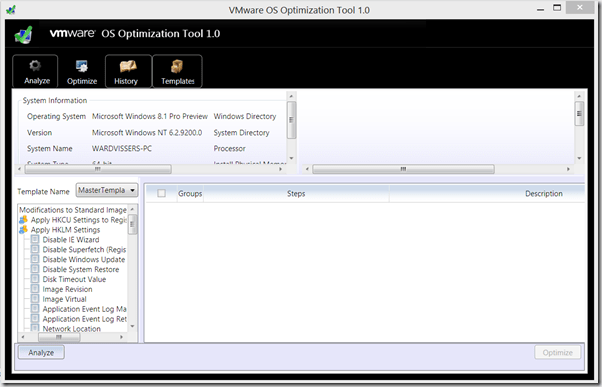
VMware OS Optimization Tool

The VMware OS Optimization Tool helps optimize Windows 7 desktops for use with VMware Horizon View. The optimization tool includes customizable templates to enable or disable Windows system services and features, per VMware recommendations and best practices, across multiple systems. Since most Windows system services are enabled by default, the optimization tool can be used to easily disable unnecessary services and features to improve performance.

You can perform the following actions using the VMware OS Optimization Tool:

  • Analyze
  • Optimize
  • Viewing History
  • Managing Template

Also included is the Remote OS Optimization Tool, which uses the same functionality as the Optimization Tool, but connects to a remote VMware View broker so that remote parent and template VMs can be enumerated and optimized.

image7

MDT Build numbers

MDT Build nummers

MDT 2013 Preview

6.2.5014.0

MDT 2012 update 1

6.1.2373.0

MDT 2010 update 1

5.1.1642.01

MDT 2010

5.0.1641.0

Microsoft Deployment Toolkit 2013 Preview

The Client Management team is happy to announce the availability of the Microsoft Deployment Toolkit (MDT) 2013 Preview. Download the installer file and release notes from the Client Management program on Connect in the MDT group.

New members must first join the MDT group of the Client Management program on Connect.

MDT 2013 Preview includes:

  • Support for the Windows Assessment and Deployment Kit (ADK) for Windows 8.1 Preview. (The Windows ADK for Windows 8.1 Preview is available on the Microsoft Download Center.)
  • Support for deployment of Windows 8.1 Preview and Windows Server 2012 R2 Preview, as well as Windows 7 and Windows 8 families of operating systems.
  • Support for zero-touch integration (ZTI) with System Center 2012 R2 Configuration Manager Preview.

We encourage you to download and use MDT 2013 Preview, and then submit suggestions, bugs and feedback via the Connect site

Windows 8.1 & Server 2012 R2 Preview Availably

If you have a Technet or a MSDN account you can download Windows 8.1 & Server 2012 R2 Preview

Windows 8.1 Preview
image

Server 2012 R2 Preview
image

ADK for Windows 8.1 Preview Available

Here is a quick summary of the changes in ADK for Windows 8.1. MDT 2013  and ConfigMgr 2012 R2 requires ADK for Windows 8.1.

Windows 8.1 Image Size (Preview)
  • Windows 8.1 Preview Code Image (x86), 2.13 GB (WIM), 7.65 GB expanded on disk.
WinPE 5.0
  • Profiling in WinPE 5.0 is removed
  • WinPE 5.0 x64 supports 4 TB of RAM (still 64 GB for x86)
  • Scratchspace set automatically to 512 MB when having more than 1 GB of RAM, otherwise 32 MB
USMT 6.3
  • Support for Windows 8.1
  • You cannot use USMT 6.3 to migrate settings from Windows XP to Windows 8.1
  • Supports Office 2013 (hotfix available for USMT 5.0).
Windows 8.1 Upgrade / Update
  • You are likely to have more free space available on the disk after upgrading Windows 8 to Windows 8.1
  • Windows 8.1 upgrade time, less than 20 minutes
Misc. Updates
  • Export compressed recovery image (/Export-Image)
  • Cleanup base components when superseded. (/StartComponentCleanup /ResetBase)

 Download

ADK for Windows 8.1.

News. Teched is coming… New version of ADK & MDT 2013

Here is a quick summary of the changes in ADK for Windows 8.1. MDT 2013 and ConfigMgr 2012 R2 requires ADK for Windows 8.1.

Windows 8.1 Image Size (Preview)

  • Windows 8.1 Preview Code Image (x86), 2.13 GB (WIM), 7.65 GB expanded on disk.

WinPE 5.0

  • Profiling in WinPE 5.0 is removed
  • WinPE 5.0 x64 supports 4 TB of RAM (still 64 GB for x86)
  • Scratchspace set automatically to 512 MB when having more than 1 GB of RAM, otherwise 32 MB

USMT 6.3

  • Support for Windows 8.1
  • You cannot use USMT 6.3 to migrate settings from Windows XP to Windows 8.1
  • Supports Office 2013 (hotfix available for USMT 5.0).

Windows 8.1 Upgrade / Update

  • You are likely to have more free space available on the disk after upgrading Windows 8 to Windows 8.1
  • Windows 8.1 upgrade time, less than 20 minutes

Misc. Updates

  • Export compressed recovery image (/Export-Image)
  • Cleanup base components when superseded. (/StartComponentCleanup /ResetBase)
Translate »