Exchange 2010 Hiding a Distribution Group from the Exchange Address List

Some times you want to hide a Distribution Group from de Global Address List (GAL).
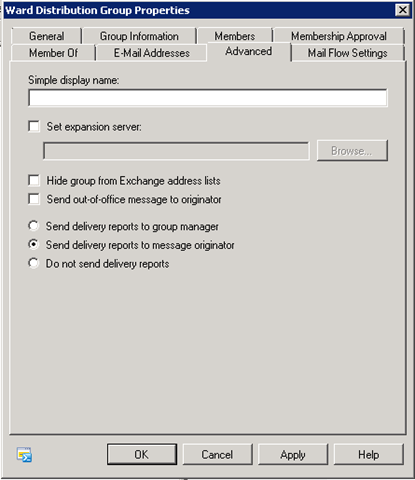
In Exchange 2010 this is a simple thing
1. Open the properties from the Distribution Group.

2. Go to the Tab Advanced
image

3. Set V by Hide group from Exchange address list

image

Certificate Manager for Exchange 2007

Exchange 2007 enables SSL within IIS by default. Using PowerShell commands, certificate creation and management is quite confusing and often results with incorrect results due to the nature of the syntax. U-BTech Solutions is providing Certificate Manager for Exchange Server 2007 freely, to ease the process with a simple, easy to use GUI which enables you to:

1) Manage your current server certificates.
2) Enable certificates for Exchange 2007 Services (POP, IMAP, SMTP, IIS, UM).
3) Generate an Exchange 2007 Certificate Signing Request and process the Certificate Authority answer.
4) Generate an Exchange 2007 Self-Signed certificate (not for production use).
5) Easily include additional subject names in a single certificate.
6) Import & Export ability for existing certificates.
To read more about Certificate Use in Exchange 2007 at Microsoft TechNet follow the link:

Certificate Manager for Exchange Server 2007 is currently offered by U-BTech Solutions free of charge

certificate-manager-main-menu[1]

Certificate Manager for Exchange Server 2007 Flash Demonstration

Download – Certificate Manager for Exchange 2007

SOURCE

Outlook 2007 Autodiscovery Warning when using SRV record for Autodiscover

Sometimes when you open Outlook 2007 using a autodiscover srv record for Exchange 2007 you wil get de following error:

autodiscover_warning_message 

Solution 1:

1. Close Outlook 2007
2. Start Registry Editor
3. In Windows 7, click Start –> RUN
4. type regedit in de box and then click OK
5. Collapse this imageExpand this image
6. HKEY_CURRENT_USER\Software\Microsoft\Office\12.0\Outlook\AutoDiscover
7. Click the Edit menu, point to New, and then click String Value.
8. Type RedirectServers, and then press ENTER
9. Right-click RedirectServers, and then click Modify.
10. In the Value data box, type a semicolon delimited list of the HTTPS servers to which AutoDiscover can be redirected without prompting for confirmation from the user, and then click OK.
For example, you want to allow for the following list of servers:
  – https://wardvissers.nl
  – https://wardvissers.local
11.Type the following in the Value data box: wardvissers.local;wardvissers.nl
12. On the File menu, click Exit to exit Registry Editor

Solution 2:
Setting the registry key with group policy preferences.
clip_image002

Exchange 2010 Build Numbers

If you open de Exchange Management Shell and you run the following powershell command:
Get-ExchangeServer | fl name,edition,admindisplayversion you get the Build Number from your Exchange 2007 Servers

Exchange Server 2010

Product name

Build number

Microsoft Exchange Server 2010 RTM

14.0.639.21

Update Rollup 1 for Exchange Server 2010

14.0.682.1

Update Rollup 2 for Exchange Server 2010

14.0.689.0

Update Rollup 3 for Exchange Server 2010

14.0.694.0

Update Rollup 4 for Exchange Server 2010

14.0.702.1

Exchange Server 2010 SP1 

Product name

Build number

Microsoft Exchange Server 2010 SP1

14.1.218.15


Exchange 2007 Builds Numbers

If you open de Exchange Management Shell and you run the following powershell command:
Get-ExchangeServer | fl name,edition,admindisplayversion you get the Build Number from your Exchange 2007 Servers

Exchange 2007 RTM

Product name Build number
Exchange 2007 RTM 8.0.685.25
Update Rollup 1 for Exchange Server 2007 8.0.708.3
Update Rollup 2 for Exchange Server 2007 8.0.711.2
Update Rollup 3 for Exchange Server 2007 8.0.730.1
Update Rollup 4 for Exchange Server 2007 8.0.744.0
Update Rollup 5 for Exchange Server 2007 8.0.754.0
Update Rollup 6 for Exchange Server 2007 8.0.783.2
Update Rollup 7 for Exchange Server 2007 8.0.813.0

Exchange Server 2007 Service Pack 1

Product name Build Number
Microsoft Exchange Server Exchange 2007 SP1 8.1.240.6
Update Rollup 1 for Exchange Server 2007 Service Pack 1 8.1.263.1
Update Rollup 2 for Exchange Server 2007 Service Pack 1 8.1.278.2
Update Rollup 3 for Exchange Server 2007 Service Pack 1 8.1.291.2
Update Rollup 4 for Exchange Server 2007 Service Pack 1 8.1.311.3
Update Rollup 5 for Exchange Server 2007 Service Pack 1 8.1.336.1
Update Rollup 6 for Exchange Server 2007 Service Pack 1 8.1.340.1
Update Rollup 7 for Exchange Server 2007 Service Pack 1 8.1.359.2
Update Rollup 8 for Exchange Server 2007 Service Pack 1 8.1.375.2
Update Rollup 9 for Exchange Server 2007 Service Pack 1 8.1.393.1
Update Rollup 10 for Exchange Server 2007 Service Pack 1 8.1.436.0

Exchange Server 2007 Service Pack 2

Product name Build Number
Microsoft Exchange Server 2007 SP2 8.2.176.2
Update Rollup 1 for Exchange Server 2007 Service Pack 2 8.2.217.3
Update Rollup 2 for Exchange Server 2007 Service Pack 2 8.2.234.1
Update Rollup 3 for Exchange Server 2007 Service Pack 2 8.2.247.2
Update Rollup 4 for Exchange Server 2007 Service Pack 2 8.2.254.0

Exchange Server 2007 Service Pack 3

Product name Build Number
Microsoft Exchange Server 2007 SP3 83.6

Configuring Forefront Protection 2010 for Exchange Server 2010

imageimage  
For the best performance for Forefront Protection 2010 download Microsoft Forefront Protection 2010 for Exchange Server Best Pratices Analyzer.

Want to check if you have enough Capacity. Read the Following blog post: Forefront Protection 2010 for Exchange Server (FPE) Capacity Planning Guidance v. 2

When you deploy  Forefront Protection 2010 for Exchange Server the next table is very handy

Maintain the Submission Queue Length at zero.

Apply the following script:
\MSExchangeTransport Queues(_total)\Submission Queue Length

Maintain CPU utilization at less than 75%.

Plan and conserve amount of resources required to maintain acceptable level of service.

Light-emitting diode (LED) light needs to be monitored for blinking.

The hard drive LED should maintain a blinking state. Any other state (light always on) indicates thrashing. It is important to maintain adequate disk input/output and utilize memory swapping to prevent thrashing.

FPE (or FSE) databases should be monitored and routinely maintained.

Clean/purge database to reduce size.

Enable retention policies.

Note: If you are expecting the incident database to grow soon, it is a good idea to allocate more free space for the database.

Apply service packs as required.

Perform update for all required service packs on a regular basis.

Note: Exchange Server fixes are distributed in service packs. Service packs keep the product current. Service packs include updates, system administration tools, drivers, and additional components. If you do not stay up to date on service packs, performance and product functionality are seriously compromised.

Exchange Server 2010 SP1 is coming

Exchange Team announced that SP1 for Exchange 2010 is coming with a lot new features

I highlighted the things with I like from the coming update. It’s a whole list but i thing with this update is Exchange 2010 SP1 the best version ever!!! 😀

A list of al new things in Exchange 2010 SP1:

Archiving:
– Personal Archive to a different mailbox database from their primary mailbox 😀
– You can import historical e-mail data from .PST files, directly into Exchange
– delegate access to a user’s Personal Archive
– SP1 updates the Exchange Management Console with new tools to create Retention Policy Tags
– support access to a user’s Personal Archive with Outlook 2007 Coming with A update

Outlook Web App
– Delete, mark as read, and categorize operations running asynchronously, these actions feel instantaneous to the user
– Attaching a very large file, will not block the rest of the OWA experience
– Sharing calendars to anonymous viewers via the web if you enable this.
– OWA themes back
– Reading pane can be placed on the bottom or the right side

Mobile:
– Support for send-as
– Support for notifying the user if their device has been placed on block or quarantine by their admin
– Full implementation of conversation view
– To sync only unique parts of messages.
– Setting up mobile device to access mail via POP/IMAP/SMTP, information is available in OWA.

New Management UI
– Create/configure Retention Tags + Retention Policies in EMC
– Configure Transport Rules in ECP
– Configure Journal Rules in ECP
– Configure MailTips in ECP
– Provision and configure the Personal Archive in ECP
– Configure Litigation Hold in ECP & EMC
– Configure Allow/Block/Quarantine mobile device policies in ECP
– RBAC role management in ECP
– Configure Database Availability Group (DAG) IP Addresses and Alternate Witness Server in EMC
– Recursive public folder settings management (including permissions) in EMC

Read the whole article at HERE.

Exchange 2007 The exchange server address list service failed to respond. After Upgrading Domain Controllers to 2008 R2

I want to creat a new mailbox for a new user. But i get the following error: The exchange server address list service failed to respond.
image

Solution:
Go to Organization Configuration in EMC. Right click it in EMC and select Modify Configuration Domain Controller. Point it to your DC hosting the PDC

image 

After that restart the Microsoft Exchange System Attendant services on the mailbox server.

The Microsoft Exchange System Attendant Service does the following thing:

Forwards directory lookups to a global catalog server for legacy Outlook clients, generates e-mail addresses and offline address books, updates free/busy information for legacy clients, and maintains permissions and group memberships for the server. If this service is disabled, any services that explicitly depend on it will fail to start.

Rollup 3 voor Exchange Server 2007 Service Pack 2

Microsoft heeft Rollup 3 voor Exchange 2007 Service Pack 2 vrijgegeven.

Het overzicht wat er allemaal gefixt is:
"451 4.4.0 DNS Query Failed" status message in an Exchange Server 2007 Edge Transport server

Later updates do not match a calendar item that an Exchange Server 2007 user updates by using Exchange ActiveSync on a mobile device

You receive an "0x800423f0" error message when you perform system state backups on the passive node of Windows Server 2008-based Exchange Server 2007 CCR clusters

An external recipient misses the last occurrence of a recurring meeting request or a recurring appointment that is sent from an Exchange Server 2007 user

The Edgetransport.exe process crash when it process meeting requests in Exchange Server 2007

The subject of a confirmation message is garbled for certain languages when a remote device wipe operation is performed in Exchange Server 2007

The sender address of a forwarded meeting request does not include "on behalf of" as expected in an Exchange Server 2003 organization and an Exchange Server 2007 organization mixed environment

A SSL certificate validation error is generated on an Exchange Server 2007 server when you run any test commands after you run the Test-SystemHealth command

A mailbox that was moved from an Exchange Server 2007 server to an Exchange Server 2010 server cannot be accessed by using Outlook

The Microsoft Exchange Information Store service stops responding on an Exchange Server 2007 server

The synchronization and the reconciliation between Microsoft Office Outlook and a BlackBerry mobile device fails when a mailbox is moved around between two Exchange Server 2007

The Microsoft Exchange Information Store service crashes on a Microsoft Exchange Server 2007 server when a user tries to access a specific calendar item

Read items are marked incorrectly as unread items in an Exchange Server 2007 public folder

A delegate cannot save three settings of Resource Settings for an Exchange Server 2007 resource mailbox in OWA

You receive an error message when you use ExBPA to schedule a scan on an Exchange Server 2007 SP2 server

The store.exe process hangs on an Exchange Server 2007 server

Downloaden doe je HIER
Translate »