VMware Workstation 10

VMware Workstation takes virtualization to the next level:

  • Support for the latest Guest OS’es like Microsoft Windows 8.1 and various Linux distributions.
  • The new hardware version 10 introduces even bigger and better Virtual Machines
    Up to 16 vCPUs
    64GB of vRAM
    8TB disks.
    vSATA support has been added
    Up to 20 networks can be defined.
    Various USB improvements (usb3 stream support, among other things)
    SSD pass through makes for better support of the underlying hardware platform.
  • New Virtual Appliances created with the Workstation team to quickly run various cloud stacks like Pivotal, Puppet Labs and Vagrant.

The team has included various smaller improvements in the product as well:

  • Better multi-monitor support for up to 4 screens
  • Unity mode has been enhanced to seamlessly work with Windows 8.1 UI changes
  • An updated version of VMware Converter has been built in and adds support for P2V’ing a Windows 8.1 machine
  • New option to display the VM console using VMware-KVM, a ‘screen-only’ window without any bells or whistles.

Microsoft Lync Server 2013 Protocol Workloads Poster

Learn how Lync Server can help your organization provide instant messaging, web conferencing, application sharing, and voice communication.

image

Supported Reverse Proxy for Lync 2010 & Lync 2013

This lists the server reverse proxy products that have completed solution testing with Lync Server. While any reverse proxy is expected to work with Lync Server, the reverse proxies listed below have completed extensive testing and are posted with detailed deployment white papers to assist in configuration.

Qualified for Lync 2013 & Lync 2010 

Vendor

Qualified Product

Software Version Tested

Vendor’s Lync Page

Microsoft

Internet Information Services Application Request Routing  (IIS ARR)

v2.5

IIS ARR Config Guide

Microsoft

Forefront Threat Management Gateway (TMG) **

2010

Setting up Reverse Proxy Servers with TMG

** In November, 2012, Microsoft ceased license sales of Forefront Threat Management Gateway 2010, or TMG. TMG is still a fully supported product, and is still available for sale on appliances sold by third parties.

Updated Release of MS13-061 Security Update for Exchange Server 2013

On August 14th, ExchangeTeam announced the removal of the MS13-061 Security Update for Exchange Server 2013 due to an issue where the patch changed settings for the search infrastructure, placing the content index for all databases into a failed state.  As of today, we have released updated security updates for both Exchange 2013 RTM CU1 and Exchange 2013 RTM CU2.

Download links for MS13-061:

    Kemp LoadMaster v7.0-6 Firmware Released

    LoadMaster v7.0-6 is available now. Here is a highlighted feature list over v7.0-4:
    New Features and Feature Enhancements:

    • Quickstart Wizard – Exchange 2010- The QuickStart Wizard provides a simplified method of configuring LoadMaster to work within an Exchange 2010 environment
    • RESTful API v.2.0 – The RESTful API provides a REST-like interface designed to allow remote applications access to the LoadMaster in a simple and consistent manner.
    • Cisco UCS B Series Support – The LoadMaster for Cisco UCS supports the B Series Blade Servers.
    • Call Home – Phase 1 – The Call Home licensing model will be released for selected VLM evaluations. 
    • After installing or replacing a certificate, there is now an option to return to the Virtual Service page
    • Quality of Service functionality is now configurable within Virtual Services
    • The image sets for the ESP login screens now support a number of different languages
    • The character limit within the Message of the Day has been increased
    • When applying a temporary license, feedback is now provided if a temporary license has already been applied
    • The traceroute and netstat utilities are available debug options
    • Bulk disabling of Real Servers is possible
    • L7 Transparency is available for selection within a SubVS when the parent Virtual Service uses SSL Acceleration with re-encryption enabled.


    Issues Resolved:

      • Issues configuring eth0 on a 64 bit LoadMaster have been resolved
      • Removed restriction on creating a VLAN with an identifier of 1
      • Issue with deleting VSs in a state of Security Down is resolved
      • Issue with HA time out values resolved
      • Issue with Health Checks on ESP enabled Virtual Services have been resolved
      • To conserve CPU, gathering statistics is restricted to the items displayed on the Home page, unless specified in the Collect All WUI option
      • Issue with Port Following is resolved
      • ACLs now working as expected when Virtual Services are set to additional ports
      • Initial maximum cache size on LoadMaster for UCS is now within the valid range
      • Within the LoadMaster console, an inappropriate call of Quick Help has been resolved
      • Can now configure shared interfaces in the HA setup process before rebooting
      • A failed adaptive health check disables the Real Server
      • SNORT 2.9 rules imports correctly

      Known Issues:

        • A page is not delivered when using compression and http content-length is 0 bytes
        • Issues may occur with SNMP traffic when the Drop at Drain Time End option is enabled

        LoadMaster version v7.0-6 supports the following hardware:

        • LM-2000
        • LM-2200
        • LM-2500
        • LM-2600
        • LM-3500
        • LM-3600
        • LM-5300
        • LM-5500
        • LM-Exchange
        • LM-R320
        • LMOS-UCS-B
        • VLM-100
        • VLM-1000
        • VLM-Exchange

        Learn more about LoadMaster 7.0:

        Full Release Notes
        Full Documentation

        Exchange 2010 SP3 Rollup 2 en Exchange 2010 SP2 rollup 7

        The Exchange 2010 SP2 RU7 update contains the changes for MS13-061.  For more details, see the MS13-061 security bulletin.

        The Exchange 2010 SP3 RU2 update contains fixes for a number of customer-reported and internally found issues, as well as, the changes for MS13-061. For more details, including a list of fixes included in this update, see KB 2866475 and the MS13-061 security bulletin. I would like to specifically call out the following fixes which are included in this release:

            • 2837926 Error message when you try to activate a passive copy of an Exchange Server 2010 SP3 database: “File check failed”

            • 2851419 Slow performance in some databases after Exchange Server 2010 is running continuously for at least 23 days

            • 2855083 Public Folder contents are not replicated successfully from Exchange Server 2003 or Exchange Server 2007 to Exchange Server 2010

            • 2859596 Event ID 4999 when you use a disclaimer transport rule in an environment that has Update Rollup 1 for Exchange Server 2010 SP3 installed

            • 2860037 iOS devices cannot synchronize mailboxes in an Exchange Server 2010 environment

            • 2861118 W3wp.exe process for the MSExchangeSyncAppPool application pool crashes in an Exchange Server 2010 SP2 or SP3 environment

            • 2863473 Users cannot access Outlook mailboxes that connect to a Client Access server array in an Exchange Server 2010 environment

        Exchange 2007 SP3 rollup 11

        The Exchange 2007 SP3 RU11 update contains two fixes in addition to the changes for MS13-061. For more details, including a list of fixes included in this update, see KB 2873746 and the MS13-061 security bulletin. We would like to specifically call out the following fixes which are included in this release:

        • 2688667 W3wp.exe consumes excessive CPU resources on Exchange Client Access servers when users open recurring calendar items in mailboxes by using OWA or EWS
        • 2852663 The last public folder database on Exchange 2007 cannot be removed after migrating to Exchange 2013

        VMware OS Optimization Tool

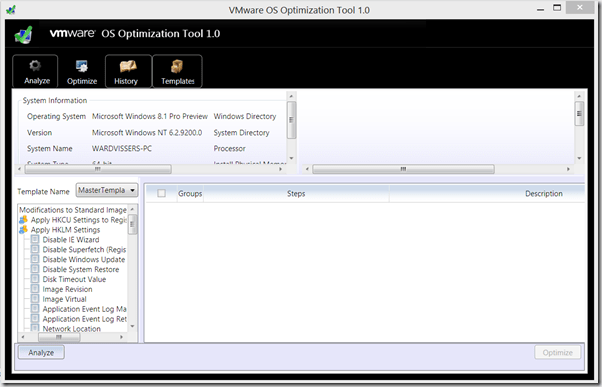
        The VMware OS Optimization Tool helps optimize Windows 7 desktops for use with VMware Horizon View. The optimization tool includes customizable templates to enable or disable Windows system services and features, per VMware recommendations and best practices, across multiple systems. Since most Windows system services are enabled by default, the optimization tool can be used to easily disable unnecessary services and features to improve performance.

        You can perform the following actions using the VMware OS Optimization Tool:

        • Analyze
        • Optimize
        • Viewing History
        • Managing Template

        Also included is the Remote OS Optimization Tool, which uses the same functionality as the Optimization Tool, but connects to a remote VMware View broker so that remote parent and template VMs can be enumerated and optimized.

        image7

        Lync 2013 Rollout and Adoption Resources

        Lync 2013 Rollout and Adoption Resources package is a collection of tools, documentation, and templates designed to help project teams plan, pilot, deploy, and evaluate the success of their Lync rollout. These resources are intended for use with the Lync 2013 Rollout and Adoption Success Kit (RASK).

        Download

        Z-Hire Active Directory User Creation Tool

        I want you to inform about a great tool.

        Z-Hire automates the IT user account creation process for Exchange mailbox, and Active Directory and Lync accounts. With just a click of the button, your Exchange mailbox, and Active directory user, Lync account and SalesForce User account will be created simultaneousy. Z-Hire serves as the platform for new hire accounts by allowing auto-creation of major IT accounts with the option for custom scripts. Z-hire will decrease your account deployment time by 600%, without the need for complicated and expensive identity management solutions. This tool makes creating Active Directory users a breeze. Some of the features include:

        – Environment Auto discovery (AD/Exchange/Lync/SalesForce)
        – Support for Active Directory user, Exchange, Lync 2010 and SalesForce user accounts
        – Template based deployment (allows consistency for all user accounts)
        – Active Directory user creation with major attributes
        – Active Directory group selection
        – Active Directory user duplicate SamAccountName detection – Lync 2010 / 2013 user account creation supporting all policies
        – SalesForce user account creation supporting all attributes
        – Faster performance (compared to previous version)

        Supported Environments / IT systems
        – Active Directory (all versions)
        – Exchange 2007 (all versions)
        – Exchange 2010 / 2013 (all versions)
        – Lync 2010 / 2013 (both Standard and Enterprise versions)
        – Office 365 Cloud
        – SalesForce Cloud

        Screenshot #1 – Active Directory
        Screenshot #2 – Active Directory
        Screenshot #3 – Active Directory
        Screenshot #4 – Exchange
        Screenshot #5 – Lync
        Screenshot #6 – Supported Systems

        SYSTEM REQUIREMENTS
        – .NET 3.5 and .NET 4.0
        – Domain Joined

        COMPATIBLE OS
        – Windows 7 X64
        – Windows Server 2008 X64
        – Windows Server 2008 R2 X64
        – Windows Server 2012

        Please download administration guide:1
        http://www.zohno.com/docs/Z-Hire_V4_Administration_Guide.pdf

        Download: Z-Hire

        Translate »