1. DNSSUFFIX in stellen. 
2. Even Adam Installeren.
Opties 1:Server Roles

Optie 2:
cmd.exe /c start /w pkgmgr.exe /iu:"DirectoryServices-ADAM"
3. Exchange 2010 Edge Installeren


4. Edge Rol geïnstalleerd 
1. DNSSUFFIX in stellen.
2. Even Adam Installeren.
Opties 1:Server Roles
Optie 2:
cmd.exe /c start /w pkgmgr.exe /iu:"DirectoryServices-ADAM"
3. Exchange 2010 Edge Installeren
4. Edge Rol geïnstalleerd
Wanneer je een Windows 7 of een Windows 2008 R2 machine uitrolt wordt er een extra partitie aangemaakt van 100 tot maximaal 300mb voor bitlocker.
Ga je toch geen gebruik maken van Bitlocker dan moet je de volgende regel toevoegen aan Customsettings.ini: DoNotCreateExtraPartition = YES dan wordt namelijk er geen extra partitie aangemaakt.
Bron: Frontslash

Oplossing Deel 1:
A newly promoted Windows 2008 domain controller may fail to advertise after completion of DCpromo
Oplossing Deel 2:
Error: 997 (Overlapped I/O operation is in progress.)
DPM Data Protector Manager Agent verwijderd
DFS Replication service opnieuw opgestart 
Eventviewer 
En gelukkig werkt alles weer naar behoren.
Exchange 2007 CCR gehad van het weekend. Kreeg de volgende melding in de eventviewer en in de gui.
Event Viewer:

GUI: 
Oplossing: ![clip_image002[4]](https://i0.wp.com/www.wardvissers.nl/wp-content/uploads/Eventid7005MicrosoftExchangecouldntreadt_DE98/clip_image0024.jpg "clip_image002[4]") Gestopt.
Gestopt.
Daarna was de melding nog steeds niet weg in de GUI. In de event viewer wel. Aangezien deze toch als passieve draait maar even herstart uitgevoerd. Nu is alles weer netjes in orde.
| Control Panel Item | Naam |
| Action Center | Microsoft.ActionCenter (Windows 7 and later only) |
| Administrative Tools | Microsoft.AdministrativeTools |
| AutoPlay | Microsoft.AutoPlay |
| Backup and Restore | Microsoft.BackupAndRestore (Windows 7 and later only) |
| Biometric Devices | Microsoft.BiometricDevices (Windows 7 and later only) |
| BitLocker Drive Encryption | Microsoft.BitLockerDriveEncryption |
| Color Management | Microsoft.ColorManagement |
| Credential Manager | Microsoft.CredentialManager (Windows 7 and later only) |
| Date and Time | Microsoft.DateAndTime |
| Default Location | Microsoft.DefaultLocation (Windows 7 and later only) |
| Default Programs | Microsoft.DefaultPrograms |
| Desktop Gadgets | Microsoft.DesktopGadgets (Windows 7 and later only) |
| Device Manager | Microsoft.DeviceManager |
| Devices and Printers | Microsoft.DevicesAndPrinters (Windows 7 and later only) |
| Display | Microsoft.Display (Windows 7 and later only) |
| Ease of Access Center | Microsoft.EaseOfAccessCenter |
| Folder Options | Microsoft.FolderOptions |
| Fonts | Microsoft.Fonts |
| Game Controllers | Microsoft.GameControllers |
| Get Programs | Microsoft.GetPrograms |
| Getting Started | Microsoft.GettingStarted (Windows 7 and later only) |
| HomeGroup | Microsoft.HomeGroup (Windows 7 and later only) |
| Indexing Options | Microsoft.IndexingOptions |
| Infrared | Microsoft.Infrared (Windows 7 and later only) |
| Internet Options | Microsoft.InternetOptions |
| iSCSI Initiator | Microsoft.iSCSIInitiator |
| Keyboard | Microsoft.Keyboard |
| Location and Other Sensors | Microsoft.LocationAndOtherSensors (Windows 7 and later only) |
| Mouse | Microsoft.Mouse |
| Network and Sharing Center | Microsoft.NetworkAndSharingCenter |
| Notification Area Icons | Microsoft.NotificationAreaIcons (Windows 7 and later only) |
| Offline Files | Microsoft.OfflineFiles |
| Parental Controls | Microsoft.ParentalControls |
| Pen and Touch | Microsoft.PenAndTouch (Windows 7 and later only) |
| People Near Me | Microsoft.PeopleNearMe |
| Performance Information and Tools | Microsoft.PerformanceInformationAndTools |
| Personalization | Microsoft.Personalization |
| Phone and Modem | Microsoft.PhoneAndModem (Windows 7 and later only) |
| Power Options | Microsoft.PowerOptions |
| Programs and Features | Microsoft.ProgramsAndFeatures |
| Recovery | Microsoft.Recovery (Windows 7 and later only) |
| Region and Language | Microsoft.RegionAndLanguage (Windows 7 and later only) |
| RemoteApp and Desktop Connections | Microsoft.RemoteAppAndDesktopConnections (Windows 7 and later only) |
| Scanners and Cameras | Microsoft.ScannersAndCameras |
| Sound | Microsoft.Sound (Windows 7 and later only) |
| Speech Recognition | Microsoft.SpeechRecognition (Windows 7 and later only) |
| Sync Center | Microsoft.SyncCenter |
| System | Microsoft.System |
| Tablet PC Settings | Microsoft.TabletPCSettings |
| Taskbar and Start Menu | Microsoft.TaskbarAndStartMenu |
| Text to Speech | Microsoft.TextToSpeech |
| Troubleshooting | Microsoft.Troubleshooting (Windows 7 and later only) |
| User Accounts | Microsoft.UserAccounts |
| Windows Anytime Upgrade | Microsoft.WindowsAnytimeUpgrade |
| Windows CardSpace | Microsoft.CardSpace |
| Windows Defender | Microsoft.WindowsDefender |
| Windows Firewall | Microsoft.WindowsFirewall |
| Windows Mobility Center | Microsoft.MobilityCenter |
| Windows SideShow | Microsoft.WindowsSideShow |
| Windows Update | Microsoft.WindowsUpdate |
VMWare heeft de nieuwe versie van View vrijgegeven met de ondersteuning van PCoIP
 |
Features: |
Downloaden doe je hier: Download
Bekijk HIER de gave demo die tijdens de introductie van VMWare View 4.0 in Nederland gemaakt werd door Eric Sloof
Core Configurator V2 is beschibaar voor Windows Server 2008 R2 Core editie
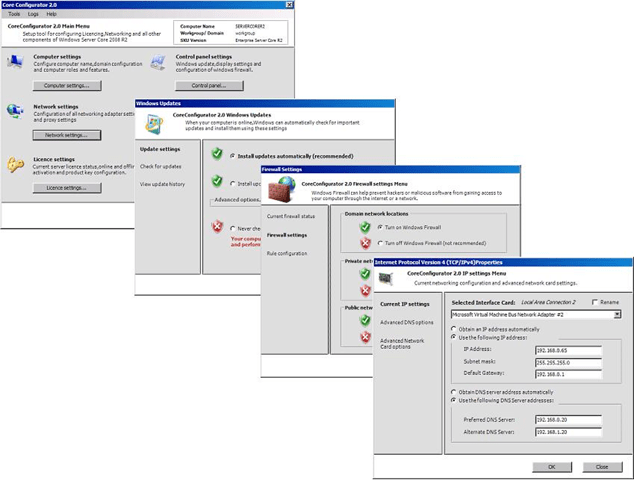 |
Core Configuration taken omvatten:
|
Downloaden doe je HIER
Voor de desbetreffende Windows XP, Windows 2003 task klik properties en ga dan naar het tabblad OS info. Pas het wachtwoord aan in de sysprep.inf & unattend.txt

Voor de desbetreffende Windows 7 & Windows Vista & Windows 2008 & Windows 2008 R2 task
klik properties en ga dan naar het tabblad OS info. Klik op Unattend.xml 
Onder oobeSystem –> amd64_Microsoft-Windows-Shell-Setup_neutral –> UserAccounts –> AdministratorPassword 
Deze poster geeft een visuele beeld van de belangrijkste technologieën in Windows Server 2008 R2. Onderwerpen Active Directory Domain Services, Hyper-V, Internet Information Services, Remote Desktop Services (Virtual Desktop Infrastructure (VDI)), BranchCache en DirectAccess technologieën.

Open de MDT Deployment Share Properties
In de twee tabs Windows PE x86 Settings & Windows PE x64 Settings vind de instellingen.
Bijvoorbeeld: Windows PE x86 Settings

Onder Windows PE Customizations vind je Custom Background Bitmap file:
Deze verwijst standaard naar: %installdir%\Samples\Background.bmp
Eigenlijke map is: C:\Program Files\Microsoft Deployment Toolkit\Samples
Her noem het de huidige Background.bmp naar Background Oud.bmp
Plaats in de zelfde map nu de nieuwe achtergrond met de naam Background.bmp
Je moet nu nog Update Deployment Share doen en zorg er voor dat regenerate boot image aanvinken.
Voeg als laatste de twee wim files opnieuw toe aan WDS en als je alles goed hebt gedaan heb je nu een custom achtergrond tijdens deployen in je achtergrond n.
