Offline Defragmentatie Exchange Database in Exchange 2003 & Exchange 2007

Een Exchange omgeving dient jaarlijks 1 of 2 een offline defragmentatie van een Exchange database gedaan te worden.

Hier onder staan een aantal stappen om dit op een juiste manier te doen.

Waar moet je allemaal op controleren:

– Zorg dat je ongeveer 130-150% vrij ruimte uit om de database te defragmenteren.
– De store’s zijn ge-unmount
– MSexchangeIs service actief is alleen voor Integerity Check.

Integerity Check
Mailbox: eseutil.exe /G  D:\Exchsvr\Data\mb01.edb
Public Folder: eseutil.exe /G  D:\Exchsvr\Data\mb01.edb 

Checksum test
Mailbox: eseutil.exe /K D:\Exchsvr\Data\mb01.edb 
Public Folder: eseutil.exe /K D:\Exchsvr\Data\mb01.edb 

Defragmentatie
Mailbox: eseutil.exe /D  D:\Exchsvr\Data\mb01.edb  D:\temp\tmp_mb01.edb
Public Folder: eseutil.exe /D  D:\Exchsvr\Data\mb01.edb  D:\temp\tmp_mb01.edb

e2k7defrag
Paar Interessante linkjes met extra Info:

Link 1 Link 2 Link 3 Link 4 Link 5

Nieuwe gratis versie van StarWind

StarWind Free is een iSCSI oplossing wat een normale Windows server binnen 10 minuten in een SAN creëert. 

– 2 TB maximaal aan storage
– Onbeperkt aantal connecties
– Support voor VMWare, Hyper-V, XenServer, Virtual Iron
– Uitgebreide ondersteuning voor VMWare (HA, DRS, Vmotion en VCB)
– Ondersteuning voor Windows Clustering zoals SQL Server & Exchange & SharePoint

Exchange 2010 hoge beschikbaarheid Video’s door Microsoft Exchange Team

Het Microsoft  Exchange Team heeft 3 video’s online gezet over hoge beschikbaarheid in
Exchange 2010.

Deel 1 wordt het concept verteld over de database mobiliteit en de functies van  database availability groups (DAGs) en mailbox database copies.

In deel 2 wordt verteld hoe je een database availability groups (DAGs) aan maakt en hoe je een Mailbox servers toevoegt aan een DAG.

Deel 3 wordt gedemonstreerd hoe er een database copy wordt gecreëerd. Ook wordt er gedemonstreerd wat Get-MailboxDatabaseCopyStatus en Test-ReplicationHealth doet.

Deel 4 komt ook binnenkort uit.

Video 1 (klik om te downloaden)

exchangevideos

Video 2 (klik om te downloaden)

exchangevideos

Video 3 (klik om te downloaden)

exchangevideos

Rollup 8 voor Exchange 2007 SP1

Microsoft heeft rollup 8 voor Exchange 2007 SP1 vrij gegeven. Verwachting is dat SP2 voor Exchange 2007 niet lang meer op zich zal wachten:

De lijst met wat Microsoft allemaal opgelost heeft:

948856 (http://support.microsoft.com/kb/948856/ ) Event ID 9667 occurs when you create a new named property on an Exchange Server 2007 server

  • 952935 (http://support.microsoft.com/kb/952935/ ) A software update is available that provides the log tracing feature for the LogTruncator tag in Exchange Server 2007

  • 954639 (http://support.microsoft.com/kb/954639/ ) Exchange Information Store service stops responding intermittently on an Exchange 2007 server

  • 955480 (http://support.microsoft.com/kb/955480/ ) Meeting requests from external senders are displayed as Busy instead of Tentative in an Exchange 2007 environment

  • 956633 (http://support.microsoft.com/kb/956633/ ) User calendar permissions are removed after you run the Set-MailboxCalendarSettings cmdlet in an Exchange Server 2007 environment

  • 957640 (http://support.microsoft.com/kb/957640/ ) The "test-*" command fails when you run it on a site that contains only CAS roles in an Exchange 2007 environment

  • 958239 (http://support.microsoft.com/kb/958239/ ) Exchange Server 2007 does not generate an event log message for public folder replication messages even though a property validation exception is thrown and the replications do not occur

  • 958881 (http://support.microsoft.com/kb/958881/ ) All HTML content in attachment files of messages is run through an HTML filter when you open or save the attachment by using Outlook Web Access (OWA)

  • 958938 (http://support.microsoft.com/kb/958938/ ) The importance attribute of a message is lost when an Exchange 2007 user accesses a high-importance message or a low-importance message from Exchange Server 2007 by using a non-Outlook POP3 client or IMAP4 client

  • 959510 (http://support.microsoft.com/kb/959510/ ) A meeting request that is sent from OWA causes a "553 5.0.0 Message-Id header line format error" NDR message in an Exchange Server 2007 environment

  • 959748 (http://support.microsoft.com/kb/959748/ ) An account with the "Exchange View-Only Administrator" permission can review user mailbox contents by using an administrative application in Exchange Server 2007

  • 959861 (http://support.microsoft.com/kb/959861/ ) Some clients cannot connect to back-end Exchange Server 2003 IMAP servers after Exchange 2007 Service Pack 1 RU2 is applied

  • 959990 (http://support.microsoft.com/kb/959990/ ) An error occurs when you try to update a recurring appointment by using an Outlook client that is connected to an Exchange 2007 server

  • 960178 (http://support.microsoft.com/kb/960178/ ) You receive an NDR when you send an e-mail using OWA Premium and the ANR cache if the Exchange organization name has more than one space

  • 960354 (http://support.microsoft.com/kb/960354/ ) Edge Attachment Filtering does not honor the ExceptionConnectors value in Exchange Server 2007

  • 960367 (http://support.microsoft.com/kb/960367/ ) Error message when you run the Export-Mailbox command on a folder that has more than 5000 items in Exchange 2007: "-1056749164"

  • 960495 (http://support.microsoft.com/kb/960495/ ) The Information Store service crashes continuously on an Exchange Server 2007 server

  • 960633 (http://support.microsoft.com/kb/960633/ ) The Microsoft Exchange Information Store service crashes on an Exchange Server 2007 that has the mailbox server role installed

  • 960703 (http://support.microsoft.com/kb/960703/ ) Extended characters are replaced by question marks when you send an e-mail message that contains extended ASCII characters by using an IMAP4 client in Exchange 2007

  • 960775 (http://support.microsoft.com/kb/960775/ ) You receive a "Message too large for this recipient" NDR that has the original message attached after you restrict the Maximum Message Send Size value in Exchange Server 2007

  • 960869 (http://support.microsoft.com/kb/960869/ ) A queue that has multiple connections cannot enter a Retry state in Exchange Server 2007

  • 961152 (http://support.microsoft.com/kb/961152/ ) The Exchange information store service (Store.exe process) crashes intermittently when you migrate user data from Lotus Notes to Exchange Server 2007

  • 961347 (http://support.microsoft.com/kb/961347/ ) Error message when you export an Exchange 2007 mailbox to a .pst file and a filter is defined: "Export-Mailbox : Error was found for <username> (<SMTP address>)"

  • 961443 (http://support.microsoft.com/kb/961443/ ) Users cannot use Outlook Web Access for Exchange Server 2007 to open an address book

  • 961524 (http://support.microsoft.com/kb/961524/ ) Some journal messages are stuck in the Submission queue in Exchange Server 2007

  • 961606 (http://support.microsoft.com/kb/961606/ ) After you apply Rollup Update 5 for Exchange Server 2007 S961606, Outlook Web Access users find the font size of plain text messages is extremely small when they use some third-party Web browsers

  • 961693 (http://support.microsoft.com/kb/961693/ ) Japanese (1 byte Kana) characters in the subject and display name are corrupted when you try to reply or forward task requests or calendar items in Outlook client

  • 962235 (http://support.microsoft.com/kb/962235/ ) The date and time information for a "Follow Up" flag is missing if an Exchange 2007 user sends a message to an external recipient

  • 966535 (http://support.microsoft.com/kb/966535/ ) Duplicate messages are sent to an external recipient if the recipient is included in multiple distribution lists in an Exchange Server 2007 environment

  • 967038 (http://support.microsoft.com/kb/967038/ ) Many log entries are generated in Exchange Server 2007 if you turn on the Exchange log to audit the logons that do not use the primary account for shared resource mailboxes

  • 967097 (http://support.microsoft.com/kb/967097/ ) Users may receive duplicate calendar items for the updated instance on mobile devices

  • 967109 (http://support.microsoft.com/kb/967109/ ) A delegate cannot accept a meeting request for an online meeting in an Exchange Server 2007 environment

  • 967255 (http://support.microsoft.com/kb/967255/ ) Only the tracing information of the last user is logged when you configure Exchange Server 2007 to trace multiple users at the same time

  • 968310 (http://support.microsoft.com/kb/968310/ ) Many log entries are generated on an Exchange Server 2007 computer when you enable the Exchange log to audit user logons that do not use the primary account for their mailbox

  • 968352 (http://support.microsoft.com/kb/968352/ ) The W3wp.exe process crashes when you use the Italian version of the spelling checker on a message in Outlook Web Access in Exchange 2007

  • 968589 (http://support.microsoft.com/kb/968589/ ) The managed policy does not work if the ptagProvisionedFid attribute is missing in Exchange Server 2007

  • 968673 (http://support.microsoft.com/kb/968673/ ) The EdgeTransport.exe file of Exchange 2007 servers crashes continuously and Event ID 10003 and Event ID 5000 occur

  • 968745 (http://support.microsoft.com/kb/968745/ ) Incomplete tasks show in the Complete tasks view in OWA 2007 in an Exchange 2007 environment

  • 968966 (http://support.microsoft.com/kb/968966/ ) Many log entries are generated in Exchange Server 2007 if you turn on the Exchange log to audit administrator logons that do not use the primary account for mailboxes

  • 969690 (http://support.microsoft.com/kb/969690/ ) Unresolved sender for delivery status notifications after applying update rollup 7 for Exchange Server 2007 Service Pack 1

  • 970687 (http://support.microsoft.com/kb/970687/ ) A search operation in Outlook does not return a correct result if there is a corrupted HTML message in the target folder in an Exchange Server 2007 environment

  • Downloaden doe je HIER

    DUCUG Nederlands Citrix Community


    Een collega van mij Edwin Houben heeft een Community genaamd DUCUG opgezet over Citrix.
    Alles wat te maken heeft met Citrix wordt hier besproken op het forum.
    Registreer je op op de site en volg de Citrix community. Alle hulp om hier een geweldig community van te maken is welkom.

    De volgende onderwerpen worden besproken:

    1. XenApp
    2. XenServer
    3. XenDesktop
    4. Provisioning Server
    5. Workflow Studio
    6. RES Powerfuse
    7. MS Terminal Server
    8. Netscaler
    9. WanScaler
    10. Scripting (VBS, Powerrshell, cmd)
    11. EdgeSite

    Success!!!!!!!!

    Hoge Beschikbaarheid in Exchange 2010

    Astrid McClean is een technische Product Manager in de Exchange-team. Een van haar taken is hoge beschikbaarheid van Exchange 2010. Het team heeft een aantal fundamentele veranderingen in de wijze van clustering is architected, geïmplementeerd en beheerd met Exchange 2010, en Astrid nam enige tijd in wandeling me door een aantal van de veranderingen.

    Video:

    image

      •    Server meerdere rollen naast elkaar kunnen bestaan op servers die een hoge beschikbaarheid.  Hierdoor kunnen kleine organisaties om een twee-server configuratie biedt volledige redundantie van gegevens mailbox, terwijl ook overbodig Client Access en Hub Transport diensten.

      •     Een beheerder niet langer nodig voor het bouwen van een failover-cluster met het oog op een hoge beschikbaarheid.  Failover clusters worden nu gemaakt door Exchange 2010 op een manier die is onzichtbaar voor de beheerder.  In tegenstelling tot eerdere versies van Exchange-clusters, die in een Exchange-voorwaarde cluster resource DLL vernoemd ExRes.dll, Exchange 2010 niet meer nodig of maakt gebruik van een cluster resource DLL.  Exchange 2010 maakt gebruik van slechts een klein gedeelte van de failover cluster componenten, te weten, haar hartslag vermogens en het cluster database, om in de database mobiliteit.

      •     Beheerders kunnen toevoegen hoge beschikbaarheid van hun Exchange-omgeving na Exchange 2010 is ingezet, zonder Exchange verwijderen en vervolgens opnieuw te implementeren in een zeer beschikbaarheid configuratie.

      •     Exchange 2010 biedt een weergave van het evenement stroom die de gebeurtenissen van het besturingssysteem met de gebeurtenissen van Exchange.

      •     Omdat opslag groep objecten die niet meer bestaan in Exchange 2010, en omdat mailbox databanken draagbare alle Exchange 2010 Mailbox servers, het is zeer gemakkelijk te verplaatsen databases als dat nodig is.

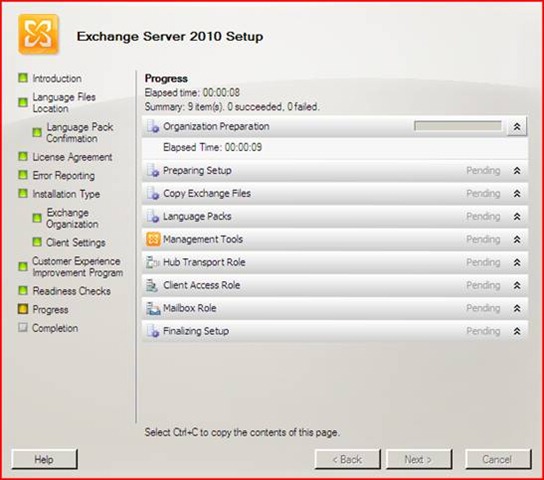
    Eisen om Exchange 2010 te kunnen installeren

    exchange2010logo
     

    De beta van Exchange 2010 wordt alleen op Windows 2008 x64 standaard of Enterprise door Microsoft ondersteund. Windows 2008 R2 kan het wel in werken maar het wordt nog niet ondersteund. Zie voor Exchange 2010 blog voor meer infomatie.

    Look here for Prepare Active Directory and Domains.

    Algemene Voorbereiding

    1. Install Microsoft .NET Framework 3.5.
    2. Install Windows Remote Management ( WinRM ) 2.0 Community Technology Preview 3 (CTP3).
    3. Install Windows PowerShell V2 CTP3.

    4. Install the update for the Microsoft Management Console (MMC) in Windows Server 2008. See Microsoft Knowledge Base article 951725 An update that extends the mechanism for displaying snap-in context Help topics is available for the MMC in Windows Server 2008.

    5. Update from KB 951725
    Update from KB 950888
    Update from KB 951116
    Update from KB 952664
    Update from KB 953290
    Update from KB 958178

    Client Access servers

    1. Install the Active Directory remote management tools by running the following command:

    ServerManagerCmd -i RSAT-ADDS

    2. Install the extensions for ASP.NET AJAX 1.0.

    3. Install the necessary Internet Information Services (IIS) prerequisites by running the following commands in the order in which they are listed:

    ServerManagerCmd -i Web-Server

    ServerManagerCmd -i Web-ISAPI-Ext

    ServerManagerCmd -i Web-Metabase

    ServerManagerCmd -i Web-Lgcy-Mgmt-Console

    ServerManagerCmd -i Web-Basic-Auth

    ServerManagerCmd -i Web-Digest-Auth

    ServerManagerCmd -i Web-Windows-Auth

    ServerManagerCmd -i Web-Dyn-Compression

    ServerManagerCmd -i NET-HTTP-Activation

    ServerManagerCmd -I RPC-over-HTTP-proxy

    Edge Transport servers

    1. Install Active Directory Lightweight Directory Services (AD LDS), which was previously known as Active Directory Application Mode (ADAM), by running the following command:

    ServerManagerCmd -i ADLDS

    Hub Transport servers

    1. Install the Active Directory remote management tools by running the following command:

    ServerManagerCmd -i RSAT-ADDS

    1. Install the extensions for ASP.NET AJAX 1.0.
    2. Install the necessary Internet Information Services (IIS) prerequisites:

    ServerManagerCmd -i Web-Server

    ServerManagerCmd -i Web-Metabase

    ServerManagerCmd -i Web-Lgcy-Mgmt-Console

    ServerManagerCmd -i Web-Basic-Auth

    ServerManagerCmd -i Web-Windows-Auth


    Mailbox servers

    1. Install the Active Directory management tools by running the following command:

    ServerManagerCmd -i RSAT-ADDS

    1. Install the extensions for ASP.NET AJAX 1.0.
    2. Install the 2007 Office System Converter: Microsoft Filter Pack.
    3. Install the necessary IIS prerequisites by running the following commands in the order in which they are listed:

    ServerManagerCmd -i Web-Server

    ServerManagerCmd -i Web-Metabase

    ServerManagerCmd -i Web-Lgcy-Mgmt-Console

    ServerManagerCmd -i Web-Basic-Auth

    ServerManagerCmd -i Web-Windows-Auth


    Clustered Mailbox

    5. ServerManagerCmd -i Failover-Clustering


    Unified Messaging servers

    1. Install the extensions for ASP.NET AJAX 1.0.
    2. Install the necessary IIS prerequisites by running the following commands in the order in which they are listed:

    ServerManagerCmd -i Web-Server

    ServerManagerCmd -i Web-Metabase

    ServerManagerCmd -i Web-Lgcy-Mgmt-Console

    ServerManagerCmd -i Web-Basic-Auth

    ServerManagerCmd -i Web-Windows-Auth

    1. Install the Microsoft Windows Media Player audio/video codecs required by the Unified Messaging server by running the following command:

    clip_image002Copy Code

    ServerManagerCmd -i Desktop-Experience

    Exchange Management Tools

    1. Install the necessary IIS prerequisites by running the following commands:

    ServerManagerCmd -i Web-Metabase

    ServerManagerCmd -i Web-Lgcy-Mgmt-Console

    To install the latest optional Windows Updates

    1. Install multiple Right Management Services (RMS) Client sessions update. See Knowledge Base article 950888 You cannot create multiple RMS Client sessions for one user context on a Windows Vista-based computer.
    2. Install performance counter updates. See Knowledge Base article 951116 A memory leak occurs in performance counters that are used to monitor Windows Server 2008-based computers.
    3. Install the System Center Operations Manager 2007 console update. See Knowledge Base article 951327 The System Center Operations Manager 2007 console may crash in Windows Server 2008 or in Windows Vista when you open the Health Explorer window.
    4. Install the Event Log service update. See Knowledge Base article 952664 The Event Log service may stop responding because of a deadlock on a Windows Server 2008-based computer.
    5. Install performance counter values update. See Knowledge Base article 953290 An application may crash when it uses legacy methods to query performance counter values in Windows Vista or in Windows Server 2008.
    6. Install Windows PowerShell V2 CTP3.

    Handige Tool IntelliAdmin Network Administrator

    – Valideer-installatie van 2009 Zomertijd Patch (Nieuw-Zeeland en Australië nu inbegrepen).
    – Pushen 2009 Zomertijd patch voor Windows NT, 2000, XP en 2003 machines
    – Uischakelen USB Drives
    – Uitschakelen cd-rom-stations
    – Uitschakelen Floppy-drives
    – Voorkom dat de automatische installatie van IE 7
    – Voorkom dat de automatische installatie van Internet Explorer 8
    – Reboot-Machines
    – Remote Uitschakelen Machines
    – Logoff-Machines
    – Zet de VNC-wachtwoord van remote machines
    – Hou machines automatisch herstarten wanneer de automatische updates hebt voltooid
    – Services Stoppen 
    – Services Starten
    – Schakel-diensten
    – Serviceses aanpassen op handmatig op automatisch zetten. 
    – Vanaf afstand Remote Desktop aan te zetten.

    Download

    Exchange 2010 Beta te Downloaden

    Microsoft heeft de Beta van Exchange 2010 vrij gegeven. De directeur van het exchange management team heeft gemeld dat officiële release van Exchange 2010 eind dit jaar gaat plaats vinden.

    Download Details: Microsoft Exchange Server 2010 Beta

    TechNet: Microsoft Exchange Server 2010 (Beta)

    We hebben weer wat te doen 😀 Voor installatie informatie check de technet artikels.

    Translate »